Odin Inspector
Odin Inspector is a powerful Unity plugin that enhances the inspector with advanced features like custom drawers, validators, and serialization improvements.
Installation
Simply import Odin Inspector into your project. Tutorial Master will automatically detect it and enable Odin attribute support for custom marker settings.
Usage
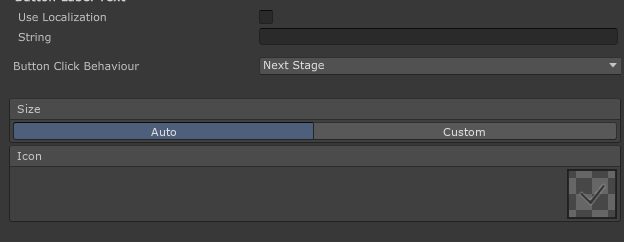
When Odin Inspector is installed, you can use Odin attributes in your custom DerivedMarkerSettings classes. These attributes will be rendered using Odin's drawing system in the Tutorial Editor.
using System;
using Sirenix.OdinInspector;
using UnityEngine;

[Serializable]
public sealed class MyCustomMarkerSettings : DerivedMarkerSettings
{
    public string Title;
    public string Description;

    [BoxGroup("Size")]
    [EnumToggleButtons]
    [HideLabel]
    public SizeMode SizeMode = SizeMode.Auto;

    [BoxGroup("Size")]
    [ShowIf(nameof(SizeMode), SizeMode.Custom)]
    public Vector2 CustomSize = new(300, 200);

    [BoxGroup("Icon")]
    [PreviewField(50)]
    [HideLabel]
    public Sprite Icon;
}

public enum SizeMode
{
    Auto,
    Custom,
}