Branch
Evaluates conditions and runs either the True or False branch.
The Branch node has one input on the left and two labeled outputs on the right: True and False. Connect the action chain that should run when conditions pass to True, and the chain that should run when they fail to False.
In the example below, On Stage Enter leads into Branch. If the conditions pass, execution continues to Spawn Marker (Pop-up) on the True output. Otherwise it follows the False output to Spawn Marker (Pointer).
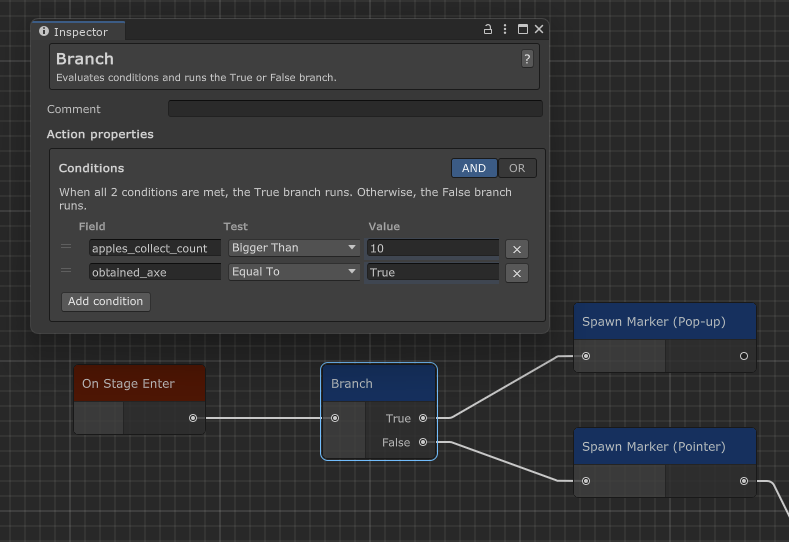
Only the branch that matches the evaluation runs. The other output is skipped for that execution.
Conditions panel
Select the Branch node to configure its conditions in the Inspector. The Conditions panel is where you define what True and False mean.
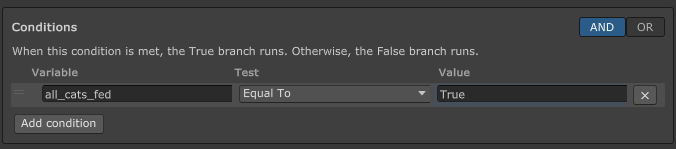
- AND - Every condition must pass.
- OR - At least one condition must pass.
With no conditions configured, Branch will default to True.
Condition rows
Each row is one check against a tutorial variable. The columns are:
| Column | What you set |
|---|---|
Variable | The variable to read at runtime. Click the field to search and pick one. |
Test | How to compare: Equal To, Not Equal To, Less Than, or Bigger Than. |
Value | The value to compare against. The field matches the variable type (integer, float, boolean, or string). |
Condition also evaluates to False if any of the following happen:
- Variable cannot be found
- The value cannot be parsed
- Parsed value does not match the variable type